What I’ve learnt this week
Peek into the model thoughts
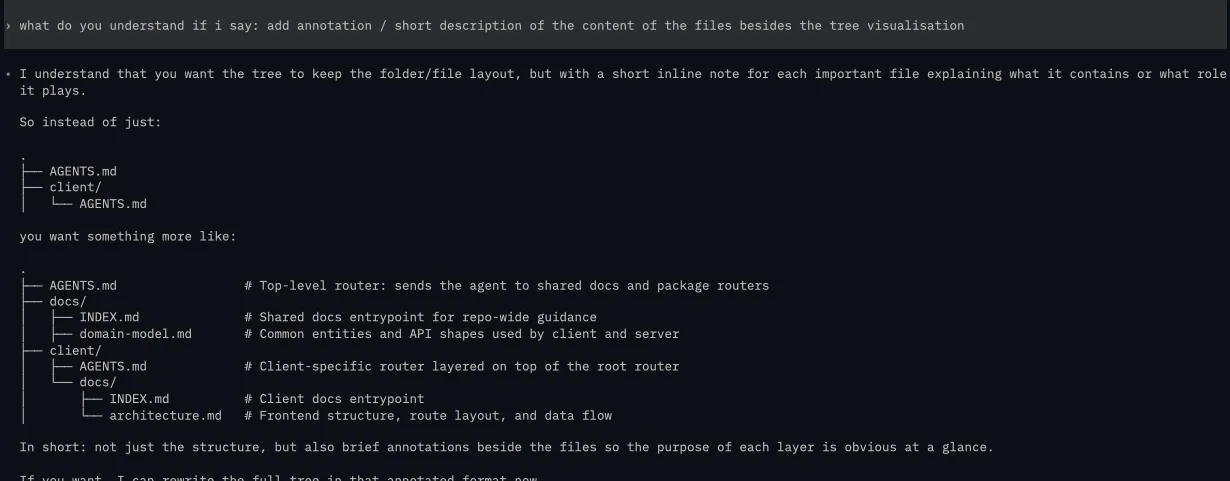
Instead of asking the model a close-ended question such as:
- do you understand
<xyz> - do
<xyz>
Ask it more open-ended questions such as:
- what do you understand of my
<x> - what do you need to do next?
The former (close-ended) leads to a yes / no (usually yes and the model does unexpected things), while the latter (open-ended) shows us what the model understood and we can tweak its understanding from there on
For example, instead of asking the model: “add annotation to the tree visualisation” which can lead to unexpected outcomes. Ask it how it interprets the request, and if the results are not expected you can provide more context to ensure alignment.
AGENTS.md as a lightweight router
Skills are popular because it was a different way to provide context to the model. Instead of using AGENTS.md which contains 100 ~ 1000 lines or even more, skills allow for progressive disclosure which reveals information on a need basis.
But progressive disclosure is not unique to skills, so why not apply it to AGENTS.md as well?
Instead of using AGENTS.md as a context dump for the codebase, treat it as a light weight router. Tell it to refer to a docs folder which contains information about your codebase architecture, style, constraints, rules and so on. The goal is to practice progressive disclosure much like skills. This way we provide the model enough to make its decision and not dump a whole chunk of information to model and hope that it’ll do something correct.
This is how i setup my files in one of my project
• .
  ├── AGENTS.md                          # Top-level router; points to shared docs and package-specific AGENTS files
  ├── docs/
  │   ├── INDEX.md                       # Shared docs entrypoint; lists repo-wide guidance to read first
  │   ├── repository-boundaries.md       # Explains what belongs at root vs inside client/server packages
  │   ├── shared-conventions.md          # Cross-project conventions: TypeScript, naming, env validation, module style
  │   ├── domain-model.md                # Shared domain terms and API/data shapes used across the repo
  │   └── shared-workflows.md            # Common setup, verification, and cross-project workflows
  ├── client/
  │   ├── AGENTS.md                      # Client router; extends root AGENTS.md and narrows to frontend-local docs
  │   └── docs/
  │       ├── INDEX.md                   # Client docs entrypoint; lists frontend-specific guidance
  │       ├── architecture.md            # Route layout, UI composition, and client-side data flow
  │       ├── conventions.md             # Frontend coding and structure rules specific to the client package
  │       └── workflows.md               # Client-only setup, run, and verification commands
  └── server/
      ├── AGENTS.md                      # Server router; extends root AGENTS.md and narrows to backend-local docs
      └── docs/
          ├── INDEX.md                   # Server docs entrypoint; lists backend-specific guidance
          ├── architecture.md            # API composition, automation flow, routing, and persistence layout
          ├── conventions.md             # Backend coding conventions and patterns specific to the server package
          └── workflows.md               # Server-only setup, run, and verification commands
Articles I found
https://latentpatterns.com/glossary/agent-harness
- A short and concise read about what harness is and how it affects an agent performance. Harness is the environment the agent is working in. It amplifies the capabilities of a model by providing it tools, memory, context management and so on.
https://www.philschmid.de/testing-skills
- a short read on how to improve agent skills, never thought of improving it outside of just using the skills I pull from the web.
- more upfront work, but it ensures the agent moves a step in our desired direction whenever a skill is used
- don’t be lazy with logging, be intentional with the information you put in and make it wide (enough context) so that its easier to grab relevant context when performing a query at 3am
- the author bought a domain just to make this blog post, what a chad
Tools I found
- a concentrated collection of ui related skills for your coding assistant
- vercel marketplace for skills
- the ai native app for agents to design with you, use your favourite coding agents for your design and you can edit it