Table of contents
Open Table of contents
overview
Previously, we covered what is multi agent architecture and the different types of it.
In this article, we will implement the plan and execute pattern to better understand how it works.
demo
architecture
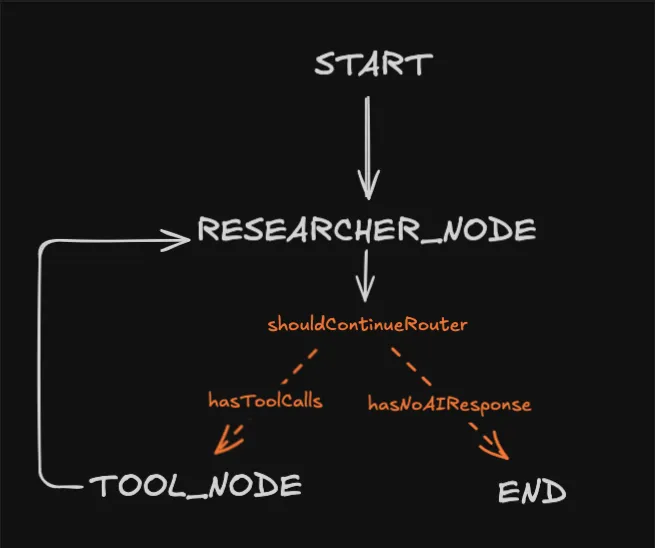
We’ll build on top of the existing research agent architecture from part three.
current architecture
updated architecture
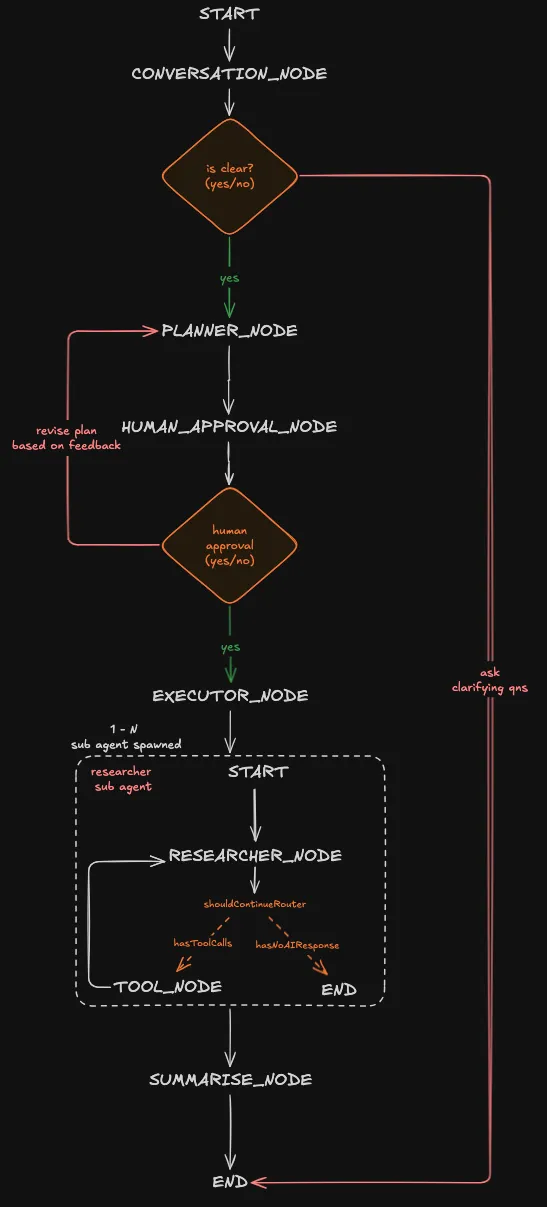
In the new architecture, we’ll add the following:
- conversation node - have a back and forth with the user to clarify their objective.
- planner node - come up with a plan based on the user objective.
- human approval node - present the generated plan to the user, they can either accept the plan or reject it with feedback
- executor node - depending on the number of task in the plan, it’ll spawn the required researcher agent to perform the research
- summarise node - combine everything from the executor node before presenting to the user
build time
The source code is available at github: https://github.com/tanshunyuan/glob-guides/tree/main/bricklaying-about-agents/multi-agent
We won’t be going through how to hook up the client to the agent, but in the source code a client tui is implemented with react ink.
The TUI client was inspired from a post https://ivanleo.com/blog/migrating-to-react-ink by ivan leo!
agent overall structure
import {
  END,
  MemorySaver,
  START,
  StateGraph,
} from "@langchain/langgraph";

const workflow = new StateGraph(overallState)
  .addNode(CONVERSATION_NODE, conversationNode, {
    ends: [PLANNER_NODE, END],
  })
  .addNode(PLANNER_NODE, plannerNode)
  .addNode(HUMAN_APPOVAL_NODE, humanApprovalNode, {
    ends: [EXECUTOR_NODE, PLANNER_NODE],
  })
  .addNode(EXECUTOR_NODE, executorNode)
  .addNode(SUMMARISE_NODE, summariseNode)
  .addEdge(START, CONVERSATION_NODE)
  .addEdge(PLANNER_NODE, HUMAN_APPOVAL_NODE)
  .addEdge(EXECUTOR_NODE, SUMMARISE_NODE)
  .addEdge(SUMMARISE_NODE, END);


export const agent = workflow.compile({
  checkpointer: new MemorySaver(),
});
This is a codified version of the architecture we saw at the top. It shows what nodes we implemented and how they’re connected through the different edges.
Two nodes stand out:
- CONVERSATION_NODE
- HUMAN_APPROVAL_NODE
Both have an ends attribute in the third parameter. It tells LangGraph that for this particular node it can terminate in more than one place.
For example, the CONVERSATION_NODE can either head to the PLANNER_NODE to create a plan or the END node to continue a conversation with the user.
Refer to this link for more info: https://docs.langchain.com/oss/javascript/langgraph/use-graph-api#combine-control-flow-and-state-updates-with-command
agent State
We’ll create an agent state to keep track of what it has done and control the information being passed to the model. Making the agent stateful.
import { MessagesValue, StateSchema } from "@langchain/langgraph";
import { AIMessage } from "langchain";
import z from "zod";

const overallState = new StateSchema({
  /**@description collection of messages between the user and agent */
  messages: MessagesValue,
  objective: z.string(),
  /**@description plan consisting a list of tasks */
  plan: z.array(z.string()),
  completedTaskAndResult: z.record(
    z.string(),
    z.string()
  ),
  feedback: z.string().optional(),
  result: z.string(),
});
type OverallState = typeof overallState;- messages - contains the history of conversation between the user and the agent
- objective - the goal of this research which is generated from
CONVERSATION_NODE - plan - a list of task the agent will take to achieve the objective generated from
PLANNER_NODE - completedTaskAndResult - an object keeping track of the completed task and its result. it is populated by the
EXECUTOR_NODEandresearcherAgent. - feedback - a optional field about the plan generated from
PLANNER_NODEgiven by the user from theHUMAN_APPROVAL_NODE - result - the final result that combines
completedTaskAndResultinto a coherent piece of information
With both agent state and the architecture out of the way, we can focus on the nodes.
conversation node
import { ChatOpenAI } from "@langchain/openai";
import { Command, END, GraphNode } from "@langchain/langgraph";
import { AIMessage, SystemMessage } from "langchain";
import z from "zod";

import { env } from "../../env.js";

const CONVERSATION_NODE = "conversationNode";
const conversationNode: GraphNode<OverallState> = async (state, config) => {
  const schema = z.object({
    is_clear: z
      .boolean()
      .describe(
        "True only if the user's message contains a specific, actionable task. False if vague, incomplete, or ambiguous.",
      ),
    objective: z
      .string()
      .nullable()
      .describe(
        "A concise restatement of the user's goal. Only populated when is_clear is true. Null otherwise.",
      ),
    followup: z
      .string()
      .nullable()
      .describe(
        "A single clarifying question to resolve ambiguity. Only populated when is_clear is false. Null otherwise.",
      ),
  });

  const model = new ChatOpenAI({
    model: "gpt-4.1-mini",
    apiKey: env.OPENAI_API_KEY,
  }).withStructuredOutput(schema);

  const systemPrompt = new SystemMessage(`
    You are an intent classifier for an AI agent pipeline.

    Given the conversation history, determine if the user has expressed a clear,
    actionable objective.

    Rules:
    - is_clear = true ONLY if you can extract a specific, self-contained task
    - is_clear = false if the request is vague, incomplete, or requires assumptions
    - If is_clear = true: populate 'objective' with a concise restatement of the
      user's goal. Set  'followup' to null.
    - If is_clear = false: populate 'followup' with a single, specific clarifying
      question. Set 'objective' to null.

    Examples of CLEAR: "Summarize this PDF", "Write a SQL query to find top 10 customers"
    Examples of VAGUE: "Help me with my project", "Do something with this data"
  `);
  const response = await model.invoke([systemPrompt, ...state.messages]);

  if (!response.is_clear && response.followup) {
    return new Command({
      update: {
        messages: [new AIMessage(response.followup)],
      },
      goto: END,
    });
  } else {
    return new Command({
      update: {
        objective: response.objective!,
      },
      goto: PLANNER_NODE,
    });
  }
};
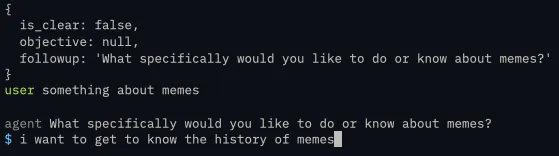
A schema is used to ensure a structured output from the model, we need it to reliably tell us:
- If the request isn’t clear it should generate a follow up question to further prompt the user.
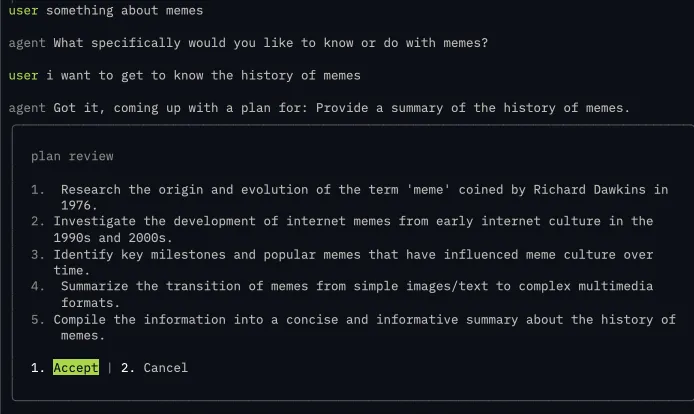
- Else it should generate an objective and proceed to the planner node
By following up with the user, we prevent the agent from acting on vague request which can waste tokens downstream
Also, Command class is used to:
- update the agent state
- navigate the agent to the next node, either END or PLANNER_NODE
user request isn’t clear and requires a follow up
user request and does not require a follow up

planner node
import { ChatOpenAI } from "@langchain/openai";
import { Command, GraphNode } from "@langchain/langgraph";
import { HumanMessage, SystemMessage } from "langchain";
import z from "zod";

import { env } from "../../env.js";

const PLANNER_NODE = "plannerNode";
const plannerNode: GraphNode<OverallState> = async (state, config) => {
  const schema = z.object({
    plan: z.array(z.string()),
  });
  const model = new ChatOpenAI({
    model: "gpt-4.1-mini",
    apiKey: env.OPENAI_API_KEY,
  }).withStructuredOutput(schema);

  const systemPrompt = new SystemMessage(`
    You are planning the next step for the agent.

    Return a plan for the user's objective.
  `);

  const plannerRequest = !state.feedback
    ? new HumanMessage(`Objective: ${state.objective}`)
    : new HumanMessage(`
      Revise the plan based on the user's feedback.

      Objective:
      ${state.objective}

      Previous plan:
      ${state.plan.join("\n")}

      ${!state.feedback ? "" : `User feedback: ${state.feedback}`}
  `);

  const response = await model.invoke([
    systemPrompt,
    ...state.messages,
    plannerRequest,
  ]);

  return new Command({
    update: {
      plan: response.plan,
      feedback: undefined,
    },
    goto: HUMAN_APPOVAL_NODE,
  });
};
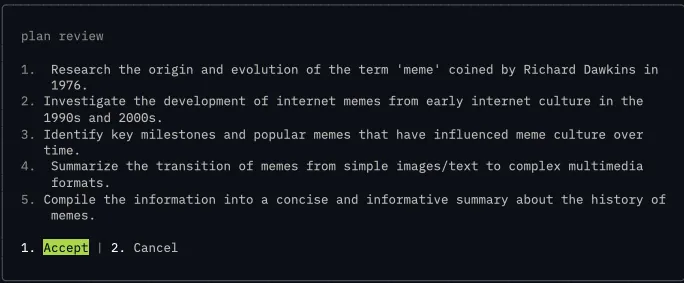
The planner node will generate a plan based off the objective from the CONVERSATION_NODE.
Crucially, if there is a feedback from the HUMAN_APPROVAL_NODE, it’ll regenerate a plan based on the user feedback and pass it back to HUMAN_APPROVAL_NODE for the user to review.
We pass in the previous plan as well to give the model a point of reference what it has generated and how it can modify the plan based on the feedback
generated plan
human approval node
import { Command, END, GraphNode, interrupt } from "@langchain/langgraph";

export type HumanApprovalResponse =
  | {
      type: "accept";
    }
  | {
      type: "cancel";
      feedback: string | undefined;
    };

export type HumanApprovalRequest = {
  name: string;
  description: string;
  content: string[];
  actions: HumanApprovalResponse[];
};
const HUMAN_APPOVAL_NODE = "humanApprovalNode";
const humanApprovalNode: GraphNode<OverallState> = async (
  state,
): Promise<Command<OverallState>> => {
  const interruptRequest: HumanApprovalRequest = {
    name: "Plan Review",
    description: "Review the plan suggested by the planner",
    content: state.plan,
    actions: [{ type: "accept" }, { type: "cancel", feedback: undefined }],
  };

  const response: HumanApprovalResponse = interrupt(interruptRequest);
  switch (response.type) {
    case "accept":
      return new Command({
        goto: EXECUTOR_NODE,
      });
    case "cancel":
      return new Command({
        goto: PLANNER_NODE,
        update: {
          feedback: response.feedback
            ? `The user rejected the plan. Feedback: ${response.feedback}`
            : "The user rejected the plan.",
        },
      });
  }
};
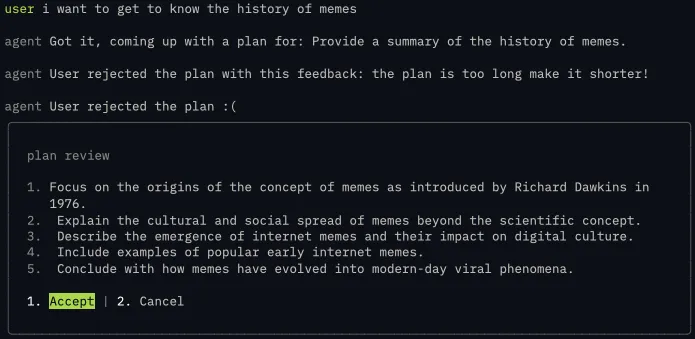
Before the agent starts to work on the task within the plan, it needs to seek the user input. This pattern is called Human In The Loop and we use interrupt class from LangGraph to surface the plan for review.
If the user accepts the plan, it’ll head to the EXECUTOR_NODE next.
Else it’ll go back to the PLANNER_NODE to come up with a new plan for the user to review.
rejecting the plan with feedback
before
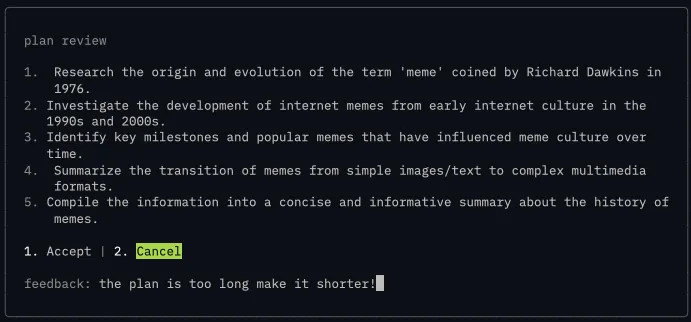
revised plan after the feedback from user
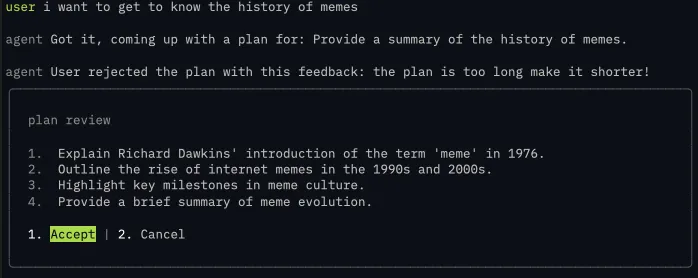
rejecting the plan without feedback
before
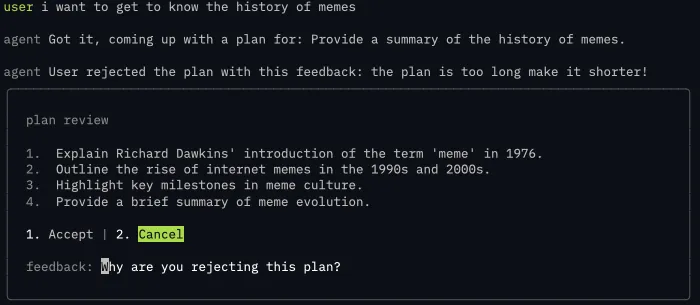
revised plan after no feedback from user
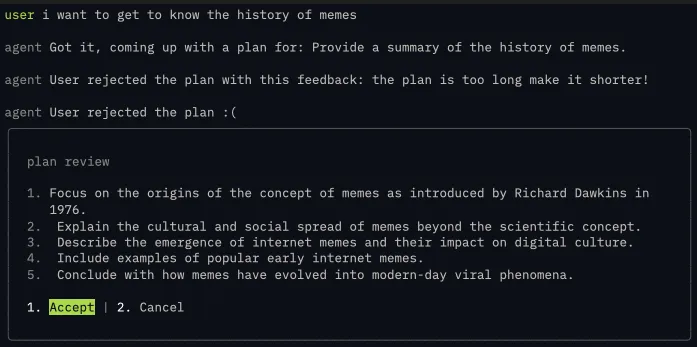
accepting the plan
executor node
import { Command, GraphNode } from "@langchain/langgraph";
import { dispatchCustomEvent } from "@langchain/core/callbacks/dispatch";

const executorNode: GraphNode<OverallState> = async (state, config) => {
  const taskAndResult: Record<string, string> = {};
  for (const task of state.plan) {
    dispatchCustomEvent("task_start", { task });
    const response = await researcherAgent.invoke({
      task,
    });
    taskAndResult[task] = response.result.text
    dispatchCustomEvent("task_done", { task });
  }
  console.log(taskAndResult)
  return new Command({
    update: {
      completedTaskAndResult: taskAndResult,
    },
  });
};
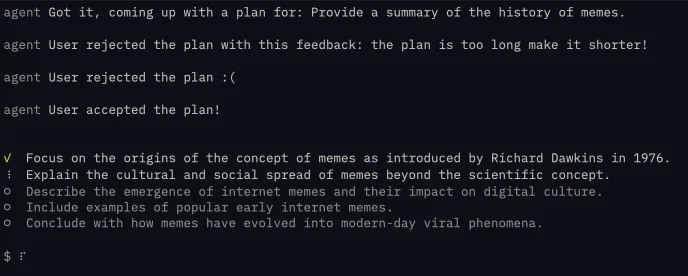
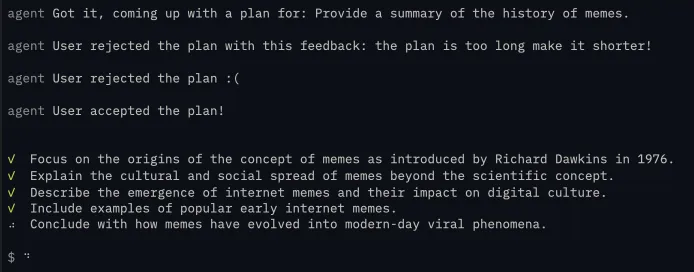
This node is the magic sauce, based on the plan we generated we’ll loop through it sequentially and assign the researcher sub agent a task. It’ll find information based on the task and return the final result to the parent agent when its done.
Now the parent agent doesn’t need to care about what has happened in the researcher, it just needs the result of it, preventing context bloating on the parent agent.
The result of the researcher will be stored in the completedTaskAndResult agent memory, passing it to the SUMMARIZER_AGENT
import { ChatOpenAI } from "@langchain/openai";
import {
  Command,
  END,
  HumanMessage,
  MessagesValue,
  START,
  StateGraph,
  StateSchema,
  SystemMessage,
} from "@langchain/langgraph";
import { AIMessage } from "langchain";
import z from "zod";

import { env } from "../../env.js";

const researcherState = new StateSchema({
  messages: MessagesValue,
  task: z.string(),
  result: z.custom<AIMessage>((val) => val instanceof AIMessage),
});
/**@description researcher sub agent */
const researcherAgent = new StateGraph(researcherState)
  .addNode("researcherNode", async (state) => {
    const model = new ChatOpenAI({
      model: "gpt-4.1-mini",
      apiKey: env.OPENAI_API_KEY,
      streaming: true,
    });
    const RESEARCHER_SYSTEM_MESSAGE = new SystemMessage(`
      You are a research assistant that helps users find and synthesize information on any topic.

      When given a research question:
      1. Synthesize findings into a clear, concise response
      2. Include source links in your answer

      Guidelines:
      - Prioritize recent sources when timeliness matters
      - Present multiple perspectives for debated topics
      - Be transparent about conflicting information or gaps in available data
      - Keep responses focused on answering the specific question asked
      `);

    const response = await model.invoke([
      RESEARCHER_SYSTEM_MESSAGE,
      new HumanMessage(state.task),
    ]);

    return new Command({
      update: {
        result: response,
      },
    });
  })
  .addEdge(START, "researcherNode")
  .addEdge("researcherNode", END)
  .compile();
The researcher itself will have its own state so that anything that it does is contained within itself and only return the completed result back to the parent agent. I didn’t include any tool calling here, but you can plug in actual search tools like tavily or serp to perform the web search
working on the plan
a peek into completedTaskAndResult
This information is backfilled which is why it looks a bit different from the plan you’re seeing
{
  "Research and compile a concise summary of the history of memes, covering their origin, evolution, rise on the internet, and cultural impact into a single cohesive overview.":

  "The concept of \"memes\" originated in 1976 with evolutionary biologist Richard Dawkins, who coined the term in his book *The Selfish Gene*. Dawkins described memes as units of cultural transmission or imitation, analogous to genes in biological evolution, spreading ideas, behaviors, or styles within a culture.\n\nMemes existed in oral and cultural traditions long before the internet, manifesting as catchphrases, fashion, or rituals. With the rise of the internet in the late 1990s and early 2000s, memes transformed into digital forms, often images, videos, or phrases that rapidly spread online. Early internet memes included phenomena like the \"Dancing Baby\" (1996) and \"All Your Base Are Belong To Us\" (early 2000s).\n\nThe evolution of internet memes accelerated with the growth of social media platforms such as 4chan, Reddit, Tumblr, and later Twitter and Instagram. These platforms enabled user-generated content, remix culture, and viral sharing mechanics, turning memes into a dominant form of online communication and humor. The accessibility of meme-making tools further democratized content creation.\n\nCulturally, memes have grown from niche internet jokes into powerful vectors of social commentary, political expression, and community building. They influence public opinion, marketing, and even political campaigns, serving both humorous and subversive roles. However, memes also raise concerns about misinformation and cultural appropriation.\n\nIn summary, memes originated as a concept describing cultural replication, evolved through traditional media, and found new life on the internet as rapid, viral forms of expression, profoundly shaping contemporary culture and communication.\n\n### Sources\n- Dawkins, R. (1976). *The Selfish Gene*. Oxford University Press.\n- Shifman, L. (2014). *Memes in Digital Culture*. MIT Press.\n- Milner, R. M. (2016). *The World Made Meme: Public Conversations and Participatory Media*. MIT Press.\n- Know Your Meme Database: https://knowyourmeme.com/memes/history-of-memes\n- The New York Times on meme culture: https://www.nytimes.com/2019/07/15/style/memes.html"
}
summarise node
import { ChatOpenAI } from "@langchain/openai";
import { Command, GraphNode } from "@langchain/langgraph";
import { HumanMessage, SystemMessage } from "langchain";

const SUMMARISE_NODE = "summariseNode";
const summariseNode: GraphNode<OverallState> = async (state, config) => {
  const allResults = Object.values(state.completedTaskAndResult);
  const model = new ChatOpenAI({
    model: "gpt-4.1-mini",
    apiKey: env.OPENAI_API_KEY,
    streaming: true,
  });
  const systemPrompt = new SystemMessage(`
    you are a synthesizer, you take in all this information and respond with the final thing
    `);
  const response = await model.invoke([
    systemPrompt,
    new HumanMessage(allResults.join("\n")),
  ]);

  return new Command({
    update: {
      result: response.text,
    },
  });
};
This is the final step of the whole process, after we get the information from state.completedTaskAndResult it can be disjointed and can contain some redundant data. So we pass these information through another llm to make sure the output is coherent
the final result
Memes originated as a scientific concept introduced by Richard Dawkins in his 1976 book
      *The Selfish Gene*, where he coined the term "meme" to describe units of cultural
     transmission—ideas, behaviors, styles, or practices that propagate through imitation
     much like genes transmit biological information. Dawkins proposed memes as replicators
     capable of variation and selection, providing a framework for understanding cultural
     evolution through an evolutionary biology lens.

     Since then, memes have evolved far beyond this original definition, especially with the
      rise of the internet and social media. Early internet memes—such as the Dancing Baby
     (1996), All Your Base Are Belong To Us (early 2000s), Hamster Dance, LOLCats,
     Rickrolling, and Doge—illustrated how humorous or catchy images, phrases, and videos
     could spread rapidly and widely online. These viral phenomena laid the groundwork for
     meme culture as participatory, remixable, and highly adaptable communication.

     In contemporary digital culture, memes function as a dynamic form of modern folklore
     and social currency. They serve multiple purposes:

     - **Cultural expression:** Memes encapsulate ideas, emotions, humor, and social
     commentary in simple, relatable formats that resonate across diverse demographics and
     transcend language barriers.
     - **Social interaction:** Platforms like Twitter, Instagram, Reddit, TikTok, and others
      accelerate meme dissemination, enabling users to create, modify, and share content
     collaboratively, fostering community and shaping social discourse.
     - **Influence:** Memes impact public opinion, political activism, marketing, and
     identity formation, illustrating how cultural narratives evolve in decentralized,
     digital environments.

     Though memes promote creativity and democratize cultural participation, they also raise
      concerns around misinformation, intellectual property, cultural appropriation, and
     representation.

     **In summary:**

     - **Origin:** Richard Dawkins framed memes as units of cultural evolution analogous to
     genes.
     - **Early internet memes:** Viral artifacts like Dancing Baby and LOLCats showed how
     digital culture adopted and transformed the concept.
     - **Modern memes:** Rapidly evolving, participatory, and influential elements of
     digital communication shaping culture, society, and online interaction.

     **Key references for deeper understanding:**

     - Dawkins, R. (1976). *The Selfish Gene*.
     - Shifman, L. (2014). *Memes in Digital Culture*. MIT Press.
     - Milner, R. M. (2016). *The World Made Meme: Public Conversations and Participatory
     Media*. MIT Press.
     - Phillips, W. (2015). *This Is Why We Can’t Have Nice Things: Mapping the Relationship
      Between Online Trolling and Mainstream Culture*. MIT Press.
     - Know Your Meme: https://knowyourmeme.com/
     - Stanford Encyclopedia of Philosophy, Memetics entry:
     https://plato.stanford.edu/entries/memetics/
     - The Guardian, How Internet Memes Have Revolutionised Culture: https://www.theguardian
     .com/technology/2018/oct/01/how-internet-memes-have-revolutionised-culture

     Memes exemplify how cultural transmission has adapted and accelerated through digital
     technologies, serving as powerful, evolving artifacts of human creativity and social
     connection.
the whole code
import { ChatOpenAI } from "@langchain/openai";
import { env } from "../../env.js";
import {
  Command,
  END,
  GraphNode,
  interrupt,
  MemorySaver,
  MessagesValue,
  START,
  StateGraph,
  StateSchema,
} from "@langchain/langgraph";
import { SystemMessage, HumanMessage, AIMessage } from "langchain";
import { dispatchCustomEvent } from "@langchain/core/callbacks/dispatch";
import z from "zod";

const overallState = new StateSchema({
  /**@description collection of messages between the user and agent */
  messages: MessagesValue,
  objective: z.string(),
  /**@description plan consisting a list of tasks */
  plan: z.array(z.string()),
  completedTaskAndResult: z.record(z.string(), z.string()),
  feedback: z.string().optional(),
  result: z.string(),
});
type OverallState = typeof overallState;

const CONVERSATION_NODE = "conversationNode";
const conversationNode: GraphNode<OverallState> = async (state, config) => {
  const schema = z.object({
    is_clear: z
      .boolean()
      .describe(
        "True only if the user's message contains a specific, actionable task. False if vague, incomplete, or ambiguous.",
      ),
    objective: z
      .string()
      .nullable()
      .describe(
        "A concise restatement of the user's goal. Only populated when is_clear is true. Null otherwise.",
      ),
    followup: z
      .string()
      .nullable()
      .describe(
        "A single clarifying question to resolve ambiguity. Only populated when is_clear is false. Null otherwise.",
      ),
  });

  const model = new ChatOpenAI({
    model: "gpt-4.1-mini",
    apiKey: env.OPENAI_API_KEY,
  }).withStructuredOutput(schema);

  const systemPrompt = new SystemMessage(`
    You are an intent classifier for an AI agent pipeline.

    Given the conversation history, determine if the user has expressed a clear,
    actionable objective.

    Rules:
    - is_clear = true ONLY if you can extract a specific, self-contained task
    - is_clear = false if the request is vague, incomplete, or requires assumptions
    - If is_clear = true: populate 'objective' with a concise restatement of the
      user's goal. Set  'followup' to null.
    - If is_clear = false: populate 'followup' with a single, specific clarifying
      question. Set 'objective' to null.

    Examples of CLEAR: "Summarize this PDF", "Write a SQL query to find top 10 customers"
    Examples of VAGUE: "Help me with my project", "Do something with this data"
  `);
  const response = await model.invoke([systemPrompt, ...state.messages]);

  if (!response.is_clear && response.followup) {
    return new Command({
      update: {
        messages: [new AIMessage(response.followup)],
      },
      goto: END,
    });
  } else {
    return new Command({
      update: {
        objective: response.objective!,
      },
      goto: PLANNER_NODE,
    });
  }
};

const PLANNER_NODE = "plannerNode";
const plannerNode: GraphNode<OverallState> = async (state, config) => {
  const schema = z.object({
    plan: z.array(z.string()),
  });
  const model = new ChatOpenAI({
    model: "gpt-4.1-mini",
    apiKey: env.OPENAI_API_KEY,
  }).withStructuredOutput(schema);

  const systemPrompt = new SystemMessage(`
    You are planning the next step for the agent.

    Return a plan for the user's objective.
  `);

  const plannerRequest = !state.feedback
    ? new HumanMessage(`Objective: ${state.objective}`)
    : new HumanMessage(`
      Revise the plan based on the user's feedback.

      Objective:
      ${state.objective}

      Previous plan:
      ${state.plan.join("\n")}

      ${!state.feedback ? "" : `User feedback: ${state.feedback}`}
  `);

  const response = await model.invoke([
    systemPrompt,
    ...state.messages,
    plannerRequest,
  ]);

  return new Command({
    update: {
      plan: response.plan,
      feedback: undefined,
    },
    goto: HUMAN_APPOVAL_NODE,
  });
};

export type HumanApprovalResponse =
  | {
      type: "accept";
    }
  | {
      type: "cancel";
      feedback: string | undefined;
    };

export type HumanApprovalRequest = {
  name: string;
  description: string;
  content: string[];
  actions: HumanApprovalResponse[];
};
const HUMAN_APPOVAL_NODE = "humanApprovalNode";
const humanApprovalNode: GraphNode<OverallState> = async (
  state,
): Promise<Command<OverallState>> => {
  const interruptRequest: HumanApprovalRequest = {
    name: "Plan Review",
    description: "Review the plan suggested by the planner",
    content: state.plan,
    actions: [{ type: "accept" }, { type: "cancel", feedback: undefined }],
  };

  const response: HumanApprovalResponse = interrupt(interruptRequest);
  switch (response.type) {
    case "accept":
      return new Command({
        goto: EXECUTOR_NODE,
      });
    case "cancel":
      return new Command({
        goto: PLANNER_NODE,
        update: {
          feedback: response.feedback
            ? `The user rejected the plan. Feedback: ${response.feedback}`
            : "The user rejected the plan.",
        },
      });
  }
};

const EXECUTOR_NODE = "executorNode";
const executorNode: GraphNode<OverallState> = async (state, config) => {
  const taskAndResult: Record<string, string> = {};
  for (const task of state.plan) {
    dispatchCustomEvent("task_start", { task });
    const response = await researcherAgent.invoke({
      task,
    });
    taskAndResult[task] = response.result.text;
    dispatchCustomEvent("task_done", { task });
  }
  return new Command({
    update: {
      completedTaskAndResult: taskAndResult,
    },
  });
};

const SUMMARISE_NODE = "summariseNode";
const summariseNode: GraphNode<OverallState> = async (state, config) => {
  const allResults = Object.values(state.completedTaskAndResult);
  const model = new ChatOpenAI({
    model: "gpt-4.1-mini",
    apiKey: env.OPENAI_API_KEY,
    streaming: true,
  });
  const systemPrompt = new SystemMessage(`
    you are a synthesizer, you take in all this information and respond with the final thing
    `);
  const response = await model.invoke([
    systemPrompt,
    new HumanMessage(allResults.join("\n")),
  ]);

  return new Command({
    update: {
      result: response.text,
    },
  });
};

const workflow = new StateGraph(overallState)
  .addNode(CONVERSATION_NODE, conversationNode, {
    ends: [PLANNER_NODE, END],
  })
  .addNode(PLANNER_NODE, plannerNode)
  .addNode(HUMAN_APPOVAL_NODE, humanApprovalNode, {
    ends: [EXECUTOR_NODE, PLANNER_NODE],
  })
  .addNode(EXECUTOR_NODE, executorNode)
  .addNode(SUMMARISE_NODE, summariseNode)
  .addEdge(START, CONVERSATION_NODE)
  .addEdge(PLANNER_NODE, HUMAN_APPOVAL_NODE)
  .addEdge(EXECUTOR_NODE, SUMMARISE_NODE)
  .addEdge(SUMMARISE_NODE, END);

export const agent = workflow.compile({
  checkpointer: new MemorySaver(),
});

const researcherState = new StateSchema({
  messages: MessagesValue,
  task: z.string(),
  result: z.custom<AIMessage>((val) => val instanceof AIMessage),
});
/**@description researcher sub agent */
const researcherAgent = new StateGraph(researcherState)
  .addNode("researcherNode", async (state) => {
    const model = new ChatOpenAI({
      model: "gpt-4.1-mini",
      apiKey: env.OPENAI_API_KEY,
      streaming: true,
    });
    const RESEARCHER_SYSTEM_MESSAGE = new SystemMessage(`
      You are a research assistant that helps users find and synthesize information on any topic.

      When given a research question:
      1. Synthesize findings into a clear, concise response
      2. Include source links in your answer

      Guidelines:
      - Prioritize recent sources when timeliness matters
      - Present multiple perspectives for debated topics
      - Be transparent about conflicting information or gaps in available data
      - Keep responses focused on answering the specific question asked
      `);

    const response = await model.invoke([
      RESEARCHER_SYSTEM_MESSAGE,
      new HumanMessage(state.task),
    ]);

    return new Command({
      update: {
        result: response,
      },
    });
  })
  .addEdge(START, "researcherNode")
  .addEdge("researcherNode", END)
  .compile();
conclusion
With this architecture, we can choose different models that does its job best. For example, using openai/5.2 on the planning stage, openai/4.1 to perform the execution and so on. You also use model from different providers.
Context management is key, just because its context window is 1M, it doesn’t mean we should fill it up. Overly reliant on the context window can lead to context rot, we don’t want our agent to become incoherent at turn 50.
Lastly, checkout the frontend code for the agent: https://github.com/tanshunyuan/glob-guides/blob/main/bricklaying-about-agents/multi-agent/src/index.tsx, it’ll show you how to hook it up to a UI so that it doesn’t stay as a jupyter notebook prototype.
With that, we came to the end of this series! I hope that it’s been beneficial for the readers. Now you’re equipped with the knowledge of what agents are, how to create a single and multi agent architecture! Hope you have enjoyed it!